Free AI inbox organizer -
automatic labels for Gmail & Outlook

Last reviewed: June 2026 · Replai editorial team

We sort it, you skim it. AI reads every email and drops 7 color-coded labels right inside Gmail or Outlook - so you see what needs you the second you open your inbox.

Runs every 15 minutes
No email bodies stored
Free to use
Gmail & Outlook
Professional at a clean organized desk reviewing emails on a laptop
80–90% AI accuracy
Why Replai inbox

Stop drowning in email.
Open an inbox that sorts itself.

The average professional gets 121 emails a day. Without a system, the messages that matter sink under newsletters, alerts, and follow-ups you keep losing track of. Replai brings order - automatically.

  • Labels land right inside Gmail - no new app to learn
  • Reads sender, subject, and preview - never your full email
  • Runs on a schedule you set, fully hands-free
  • Connect Gmail or Outlook in under 2 minutes
Start for free How the AI Gmail assistant works
The 7 categories

Every email gets one category.
Every label gets a color.

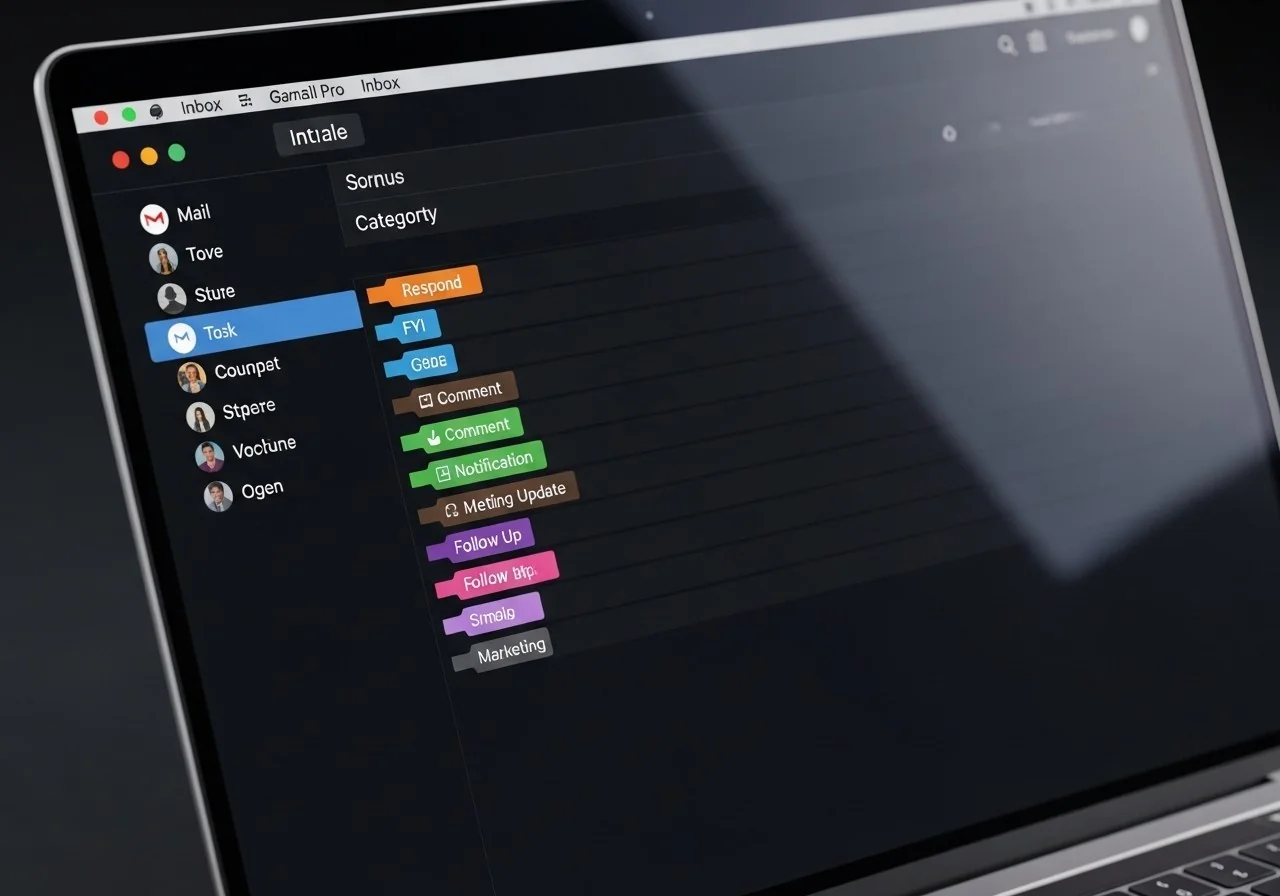
Replai gives each email exactly one of 7 smart labels - color-coded so what matters jumps out at a glance, right in your Gmail view.

1: to respond

To respond

Questions, requests, approvals - anything waiting on a reply from you.
2: FYI

For your information

CC'd announcements and threads that ask nothing of you.
3: comment

Comment

Feedback and replies that land a point but need no quick response.
4: notification

Notification

Automated alerts - receipts, order confirmations, GitHub pings, account activity.
5: meeting update

Meeting update

Invites, agendas, schedule changes, and post-call follow-up notes.
6: to follow up

To follow up

Threads gone quiet where you still need to chase a reply or a decision.
7: marketing

Marketing

Newsletters, promos, cold outreach - anything bulk-sent, not written for you.
No email bodies stored
Revoke access any time
Free - No credit card
80–90% AI accuracy
How it works

Set it up once,
then it runs itself

No setup to wrestle with. Connect your inbox once, pick how often labels refresh, and Replai handles the rest on autopilot.
1
Connect Gmail or Outlook
OAuth sign-in grants read and label access. We never store email bodies. Disconnect any time, one click, from your dashboard.
2
AI reads and sorts
It reads the sender, subject, and snippet of each email and drops it into one of seven categories - like a sharp executive assistant.
3
Labels show up in your inbox
Labels are created and applied for you - shown as colored chips in your existing Gmail view. Nothing to install.
4
Set your schedule
Pick how often labels refresh - every 15 minutes, hourly, daily, or manual only. You own the cadence, and you can stop any time.
MacBook Pro screen showing Gmail inbox with Replai color-coded category labels
Privacy first
Privacy by design

We read sender and subject.
Never your full emails.

Replai reads only what Gmail already shows in the inbox view - sender, subject line, and the first line of each email. We never open full email bodies, never store your content, and you can revoke access any time from Google's security settings.

  • Reads sender, subject, and snippet - not full email content
  • OAuth tokens stored encrypted, deleted the moment you disconnect
  • No data sold or shared with third parties
  • Revoke at myaccount.google.com/permissions any time
Start organizing free
Questions answered

Everything you need to know

No. We read the sender, subject, and preview snippet to label each email. Full email bodies never reach our servers and are never stored. Your data stays in Gmail or Outlook.
Replai adds new labels under a "Replai" parent label. It never moves emails, deletes labels, or touches your existing Gmail filters. Disconnect and the tokens are removed - the labels stay in Gmail until you delete them yourself.
It depends on how clear the subject and snippet are. In our testing, 80–90% of emails land in the right category on the first pass. Ambiguous ones - like internal replies with no subject line - are tougher and may slip occasionally.
Replai uses scheduled polling - checking your inbox on a schedule you set, as often as every 15 minutes. For most business workflows that's plenty. Real-time push sync is on the roadmap for Pro accounts.
Yes. Click "Disconnect Gmail" on the inbox organizer page and your stored tokens are deleted from our database right away. You can also revoke access from Google's security settings at myaccount.google.com/permissions. For the full picture on how Replai stores and protects your data, see our security and privacy page. Curious who builds it? Meet the team on the about page.
Yes - Replai works with both Gmail and Outlook via Microsoft OAuth. On Outlook, the same 7 AI categories are applied through Microsoft's email categories system instead of Gmail labels.
Join thousands of professionals

A cleaner inbox starts today

Create a free account, connect Gmail or Outlook in 60 seconds, and let AI do the sorting - so you can focus on what actually matters.

No credit card · Connects in under 2 minutes · Free forever